What Are Claude Skills? Complete Guide (2026)
What Claude Skills are in 2026, how SKILL.md works, where skills live, how they differ from MCP, subagents and plugins, and how to keep them safe.
Contents
- Intro
- TL;DR
- How do Claude Skills actually work?
- Where are Claude Skills stored and how do you set them up?
- What's inside a SKILL.md file?
- Which pre-built and community Skills exist today?
- How do Claude Skills use scripts and deterministic execution?
- How can developers create and test custom Skills?
- How do Skills compare to MCP, subagents, plugins and CLAUDE.md?
- How secure are Claude Skills in practice?
- What is the Agent Skills open standard, and which models run Skills?
- FAQs
- Conclusion
- Sources
A Claude Skill is a folder with a SKILL.md file: instructions, and optionally scripts and reference files, that Claude loads only when a task needs them. Skills turn a procedure you keep re-explaining into something Claude can find and follow on its own.
Intro
Anthropic introduced Agent Skills on October 16, 2025. A year later, Skills are part of Claude Code, claude.ai, the Claude API and Claude Managed Agents. The format is also published as an open standard at agentskills.io, and other tools support it.
This guide was first written in October 2025 and is updated for November 2026. It covers what a Skill is, what goes in SKILL.md, where skills live, and how they differ from MCP, subagents, plugins and CLAUDE.md.
Claude Skills are not just prompts - they're procedural memory for AI.
TL;DR
- A Skill is a folder with a
SKILL.mdmanifest. Onlydescriptionis recommended in Claude Code;nameanddescriptionare required on claude.ai and the API. - Claude sees each skill's name and description up front. It loads the full instructions only when the skill is relevant.
- You can also run a skill yourself with
/skill-name. Custom commands have been merged into skills. - Skills live in your home folder, in the repo, in plugins, in your claude.ai account, or in the Claude API.
- Custom skills do not sync across claude.ai, the API and Claude Code. You manage each surface separately.
- Treat a skill like installed software. Read it before you trust it.
How do Claude Skills actually work?
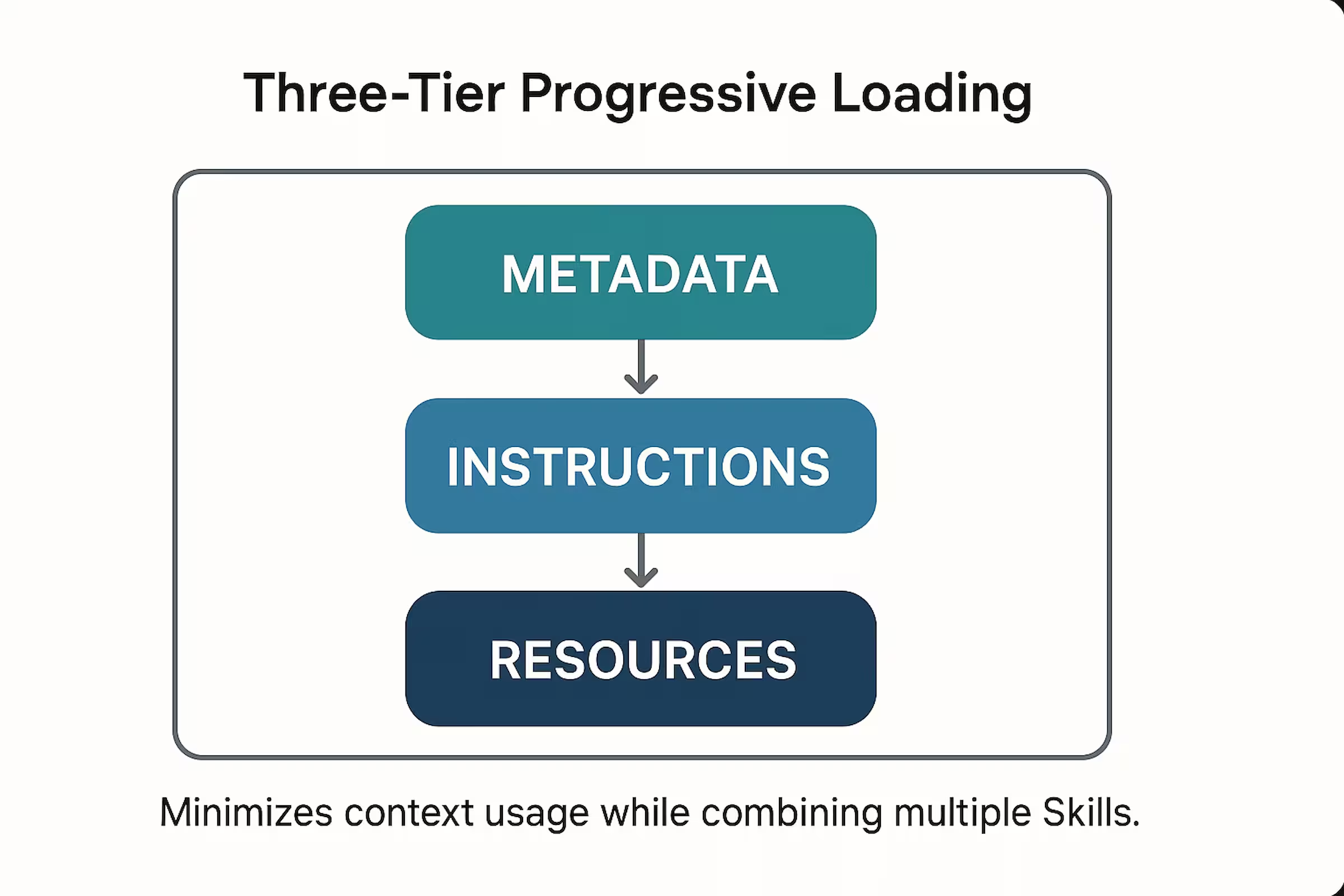
Skills use progressive disclosure: Claude loads a skill in stages, so installed skills cost little context until they are used. Anthropic's docs describe three levels.
- Metadata (Level 1): the
nameanddescriptionfrom the frontmatter. Always loaded, about 100 tokens per skill. - Instructions (Level 2): the body of
SKILL.md. Loaded when the skill triggers, under 5k tokens. - Resources (Level 3+): bundled files and scripts. Loaded as needed. A script runs through bash, and only its output enters the context.
The description is what Claude matches your request against. It has to say what the skill does and when to use it.
In Claude Code, once a skill is invoked, its rendered content enters the conversation as one message and stays there across later turns. Claude Code does not re-read the file. After auto-compaction, it may keep only the start of an invoked skill, so put the most important instructions near the top.
Takeaway: Progressive disclosure is why you can install many skills without filling the context window. (Source: Agent Skills overview, Claude Code skills docs)
Where are Claude Skills stored and how do you set them up?
In Claude Code, where you save a skill decides which sessions load it. The Claude Code docs list these locations:
| Location | Path | Loads in |
|---|---|---|
| Enterprise | .claude/skills/<name>/SKILL.md in the managed settings directory | All users on machines where your organization deploys it |
| Personal | ~/.claude/skills/<name>/SKILL.md | All your projects on this machine |
| Project | .claude/skills/<name>/SKILL.md | Sessions in that repository. Commit it so your team gets it |
| Nested | <subdir>/.claude/skills/<name>/SKILL.md | Sessions started in or below that folder |
| Plugin | <plugin>/skills/<name>/SKILL.md | Wherever the plugin is enabled, as /plugin-name:skill-name |
| claude.ai account | Skills enabled for your account | Cowork sessions, cloud sessions, and terminal sessions where you sign in with that account |
Personal skills in ~/.claude/skills/ are not read by Cowork or cloud sessions. For those, enable the skill for your claude.ai account or commit it to the repository.
Claude Code watches skill folders. If you add or edit a skill during a session, it picks up the change without a restart. If a new skill does not appear, run /reload-skills.
Outside Claude Code:
- claude.ai: pre-built skills work with no setup. You can upload custom skills as zip files on Pro, Max, Ultra, Team and Enterprise plans with code execution enabled.
- Claude API: list each skill's
typeandskill_idincontainer.skills. The code execution tool is required. Custom skills go through the/v1/skillsendpoints and are shared workspace-wide.
Takeaway: Pick the location by who should get the skill: you, the repo, the organization, or your account. (Source: Claude Code skills docs, Agent Skills overview)
What's inside a SKILL.md file?
A SKILL.md has YAML frontmatter followed by Markdown instructions. A minimal skill looks like this:
1---2name: api-conventions3description: API design patterns for this codebase. Use when writing or reviewing endpoints.4---56When writing API endpoints:7- Use RESTful naming conventions8- Return consistent error formats9- Include request validationIn Claude Code, all frontmatter fields are optional, and description is recommended. Fields include:
| Field | What it does |
|---|---|
name | Command name in the / menu. Defaults to the folder name |
description / when_to_use | Tells Claude when to apply the skill. The combined text is cut at 1,536 characters in the skill listing |
disable-model-invocation | true stops Claude from loading the skill on its own. You run it with /name |
user-invocable | false hides it from the / menu, for background knowledge |
allowed-tools | Tools Claude can use without asking during the turn that invokes the skill |
context and agent | context: fork runs the skill in a subagent of the type you name |
paths | Glob patterns for the files that activate the skill |
model and effort | Override the model or effort level for the current turn |
hooks | Hooks registered while the skill is active |
Claude Code ignores a field it does not recognize, without an error. Claude Code also follows the Agent Skills standard. Claude.ai uploads and the Skills API accept only name, description, license, compatibility, metadata and allowed-tools. An extra field makes the upload fail.
On claude.ai and the API, name can have 64 characters at most, using lowercase letters, numbers and hyphens, and cannot contain the reserved words anthropic or claude. description is required, with a limit of 1,024 characters.
Keep SKILL.md under 500 lines and move detail into supporting files such as reference.md or scripts/.
Takeaway: SKILL.md is both manifest and manual. The description decides whether Claude ever reads the rest. (Source: Claude Code skills docs, Agent Skills overview)
Which pre-built and community Skills exist today?
Anthropic ships pre-built skills for pptx, xlsx, docx and pdf, and publishes open-source examples in the anthropics/skills repository. The pre-built document skills are available on claude.ai and the Claude API. They are not available in Claude Code.
The repository's skills folder currently includes algorithmic-art, brand-guidelines, canvas-design, claude-api, doc-coauthoring, frontend-design, internal-comms, mcp-builder, skill-creator, slack-gif-creator, theme-factory, web-artifacts-builder and webapp-testing, plus the document skills. The repo says these are for demonstration and education, and that you should test them before relying on them.
Claude Code also ships bundled skills, such as /doctor, /code-review, /batch, /debug, /loop and /claude-api. These are prompt-based: they give Claude detailed instructions and let it orchestrate the work with its tools.
Takeaway: Use the examples to learn patterns. Write your own for the procedures that are specific to you. (Source: anthropics/skills, Agent Skills overview, Claude Code skills docs)
How do Claude Skills use scripts and deterministic execution?
A skill can bundle scripts. Claude runs them with bash and only the output enters the context. The script's code never loads. That makes a script cheaper and more reliable than asking Claude to write the same code on every run.
The docs give the model: instructions for flexible guidance, code for reliability, resources for factual lookup.
Where scripts run depends on the product:
- Claude Code: full network access, the same as any program on your machine.
- Claude API: a sandboxed container with no network access and no runtime package installation.
- claude.ai: network access varies with user and admin settings.
Reasoning belongs to Claude; execution belongs to code - Skills unite them.
Takeaway: Put the judgment in the instructions and the exact steps in scripts. Check what your target surface allows. (Source: Agent Skills overview)
How can developers create and test custom Skills?
Start with one repeatable workflow, write a precise description, and test whether it triggers. The Claude Code docs suggest creating a skill when you keep pasting the same checklist into chat, or when a part of CLAUDE.md has grown into a procedure.
Steps:
- Create
.claude/skills/<name>/SKILL.mdin your repo, or the same path under~/.claude/skills/. - Write a
descriptionwith the words users would naturally say. - Ask for the task in plain language, then try
/nameto run it directly. - If it does not trigger, tighten the description and check the YAML.
- Commit project skills so your team gets them.
To try Anthropic's examples, add the repo as a plugin marketplace:
1/plugin marketplace add anthropics/skills2/plugin install example-skills@anthropic-agent-skillsTo evaluate a skill, Anthropic documents the skill-creator plugin. It compares runs with and without the skill:
1/plugin install skill-creator@claude-plugins-officialTakeaway: Treat the description as the part you test most. (Source: Claude Code skills docs, anthropics/skills)
How do Skills compare to MCP, subagents, plugins and CLAUDE.md?
Skills hold knowledge and workflows. MCP connects Claude to external services. They work well together. The Claude Code docs compare them like this:
| Layer | What it is | When it loads |
|---|---|---|
| Skills | Reusable instructions, knowledge or workflows | Name and description each session, full content when used |
| CLAUDE.md | "Always do X" rules | Every session, automatically |
| MCP | Protocol for tools and data access from external services | Connected through the server |
| Subagents | Isolated workers with their own context window | When Claude delegates to one |
| Hooks | Run on lifecycle events, for example after an edit | Fire on the event, without Claude deciding |
| Plugins | Packaging layer that bundles skills, hooks, subagents and MCP servers | When installed and enabled |
A few points from the docs:
- MCP plus skills: MCP gives Claude the tools. A skill teaches it how your team uses them, for example a
/post-to-slackworkflow with your formatting rules. - Subagents plus skills: a subagent can preload skills, and a skill can run in an isolated context with
context: fork. - Hooks for guardrails: an instruction like "never edit
.env" inCLAUDE.mdor a skill is a request. A hook that blocks the edit is enforcement. - Projects: Anthropic's help center describes Projects as static background knowledge that is always loaded. Skills activate when needed.
- Slash commands: custom commands have been merged into skills. Existing
.claude/commands/files keep working.
Takeaway: Put always-true rules in CLAUDE.md, procedures in skills, connections in MCP, and must-hold rules in hooks. (Source: Extend Claude Code, Claude Help Center)
How secure are Claude Skills in practice?
A skill can direct Claude to call tools and run code, so Anthropic tells you to use skills only from trusted sources. Anthropic's guidance is to treat a skill like installing software.
| Best practice | Why it matters |
|---|---|
| Use skills you wrote or got from Anthropic | A malicious skill can steer tool calls away from its stated purpose |
| Read every bundled file, including scripts and images | Unexpected network calls or file access show up there |
| Be wary of skills that fetch external URLs | Fetched content can carry malicious instructions |
Check allowed-tools in repo skills | A skill can grant itself broad tool access, and Claude Code applies it |
| Move must-hold rules into hooks | A rule in a skill is not a guarantee |
On the Claude API, skills run in a container with no network access. In Claude Code they have the network access of any program on your machine. For Enterprise organizations, Anthropic also documents skill content scanning for custom skills uploaded in claude.ai and Claude Cowork. Scanning does not cover skills uploaded through the Skills API or the Claude Console.
Agent Skills are not covered by zero data retention arrangements. Skill data is retained under the standard policy.
Takeaway: Review a skill the way you would review a dependency. (Source: Agent Skills overview, Anthropic engineering, Claude Code skills docs)
What is the Agent Skills open standard, and which models run Skills?
Agent Skills is an open format: a folder with a SKILL.md that any compatible agent can load. The spec lives at agentskills.io, which lists many compatible tools, including Claude Code and VS Code. Anthropic's anthropics/skills repo holds Anthropic's own implementation and links to the spec.
Claude Code extends the standard with invocation control, subagent execution and dynamic context injection. Those extras only work in Claude Code.
On models, the Claude API docs list the current models as Claude Fable 5.2, Opus 5.5, Sonnet 5.5 and Haiku 5.5. The Agent Skills page lists availability as "All models" on the Claude API and the cloud platforms that offer Skills. The October 2025 version of this guide named Sonnet 4.5 as current. It no longer is.
Takeaway: A skill you write once can move between compatible tools, so keep it to the standard's fields when you want portability. (Source: agentskills.io, Models overview, Agent Skills overview)
FAQs
Do Claude Skills work outside Claude Code?
Yes. They work in claude.ai, the Claude API and Claude Managed Agents. Custom skills do not sync across surfaces, so upload or create them separately for each one.
How large should a Skill be?
Keep SKILL.md under 500 lines and move detailed reference material into separate files that Claude loads only when needed.
How do I share Skills with teammates?
Commit them to .claude/skills/ in your repo, or package them in a plugin. On the Claude API, uploaded skills are shared workspace-wide.
Why might a Skill not trigger?
Check that the description has the keywords users would say, that the skill appears when you ask what skills are available, and that the YAML parses. Malformed frontmatter loads the body with empty metadata, so Claude cannot match it. If it triggers too often, make the description more specific or set disable-model-invocation: true.
Do I still need custom slash commands?
Not for new work. Custom commands have been merged into skills, and a skill gives you supporting files too. Existing .claude/commands/ files keep working.
Conclusion
Skills are the procedural layer in Claude's toolset. They hold the steps for work you do repeatedly, load only when needed, and can carry scripts for the parts that must be exact. Used with MCP for connections, hooks for enforcement and CLAUDE.md for standing rules, they keep Claude's behavior consistent across a team.
Sources
- Anthropic Engineering – Equipping agents for the real world with Agent Skills
- Claude Code Docs – Extend Claude with skills
- Claude Code Docs – Extend Claude Code (skills vs MCP, subagents, hooks, plugins)
- Claude Platform Docs – Agent Skills overview
- Claude Platform Docs – Models overview
- Claude Help Center – What are skills?
- Agent Skills open standard (agentskills.io)
- Anthropic GitHub – Skills repository